Integrating KillingOni into Your Creative Workflow
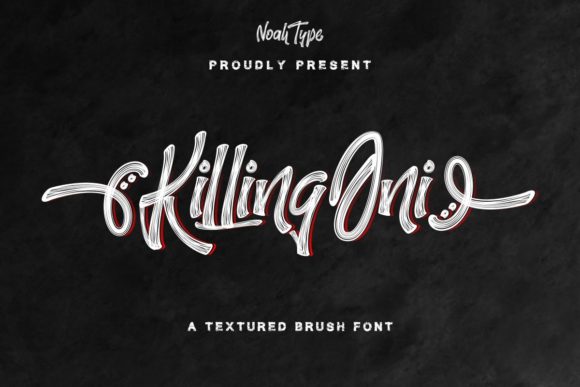
In the landscape of modern graphic design and digital branding, typography serves as more than just a vessel for information; it is a primary driver of emotional response and brand identity. For professionals ranging from freelance designers to marketing managers, selecting the right typeface is a critical decision that impacts the entire lifecycle of a project. KillingOni emerges in this space as a distinctive solution, offering a brushed, trendy, and flowing handwritten aesthetic that bridges the gap between casual authenticity and professional polish. Understanding how to effectively integrate this font into your existing workflows requires more than just installation; it demands a strategic approach to design planning, asset management, and technical execution.
Understanding the Aesthetic and Functional Role
Before implementing any new asset, it is essential to define its role within your broader design system. KillingOni is characterized by its stylish characters and organic flow, making it particularly suited for projects that require a human touch. Unlike rigid sans-serifs or traditional serifs, this handwritten font introduces movement and personality. This makes it an ideal candidate for headlines, logos, social media graphics, and packaging designs where standing out is paramount.
The versatility of KillingOni allows it to match a wide pool of designs. However, its effectiveness relies on context. In a corporate annual report, it might serve as a subtle accent for pull quotes, whereas in a lifestyle brand’s Instagram campaign, it could dominate the visual hierarchy. Recognizing where this font fits in your creative process helps prevent overuse and ensures that its unique characteristics enhance rather than distract from the core message.
Preparation and Technical Setup
Successful integration begins with proper preparation. One of the most significant technical advantages of KillingOni is its PUA (Private Use Area) encoding. For designers who may not be aware, PUA encoding allows access to all glyphs, ligatures, and swashes directly through standard character maps or design software panels, without the need for complex coding or external plugins. This feature streamlines the initial setup phase, reducing friction during the creative process.
To leverage this efficiently, follow these preparatory steps:
- Installation Verification: Ensure the font file is correctly installed on your operating system. Restart your design applications to guarantee recognition.
- Glyph Map Review: Before starting a project, open the font in a viewer to explore the available swashes and alternate characters. Knowing what options are available prevents mid-project interruptions.
- Software Compatibility Check: Verify that your primary design tools (such as Adobe Illustrator, Photoshop, or Canva) support PUA encoded fonts. Most modern professional software does, but confirming this early avoids workflow bottlenecks.
This preparation phase is crucial for maintaining efficiency. By understanding the technical capabilities of KillingOni upfront, you can plan your design layout with confidence, knowing exactly which stylistic elements are at your disposal.
Integration into the Design Process
Once prepared, the next stage is integrating the font into your actual design workflow. This phase involves balancing aesthetics with readability and brand consistency. KillingOni works best when paired with complementary typefaces. Its flowing nature contrasts effectively with clean, geometric sans-serifs or structured serifs. This pairing creates visual tension and interest, guiding the viewer’s eye through the content hierarchy.
Consider the following implementation strategies:
- Hierarchy Establishment: Use KillingOni for primary headers or key focal points. Reserve simpler fonts for body text to ensure legibility. This separation clarifies the information structure for the audience.
- Swash Utilization: Leverage the PUA encoded swashes to add custom flair to specific letters. This is particularly effective in logo design or monogram creation, where uniqueness is valued. However, use swashes sparingly to maintain clarity.
- Color and Texture Interaction: As a brushed font, KillingOni interacts dynamically with color and texture. Experiment with overlay modes in digital design or consider how ink bleed might appear in print. The texture of the brush strokes can add depth when paired with minimalist backgrounds.
During the execution phase, consistency is key. If you are working on a multi-page document or a comprehensive brand kit, establish rules for how KillingOni is used. Define specific sizes, weights, and spacing parameters. This ensures that the font contributes to a cohesive visual identity across all touchpoints, from business cards to website banners.
Workflow Efficiency and Collaboration
For teams and freelancers alike, workflow efficiency determines project profitability and client satisfaction. KillingOni supports efficient workflows through its ease of use and accessibility. Because the glyphs are easily accessible via PUA encoding, designers spend less time hunting for special characters and more time refining the overall composition. This reduction in technical friction allows for faster iteration cycles.
When collaborating with clients or other stakeholders, clear communication about font usage is vital. Provide style guides that demonstrate how KillingOni should be applied. Include examples of correct and incorrect usage, highlighting the importance of spacing and pairing. This proactive approach minimizes revision requests and ensures that the final output aligns with the initial vision.
Furthermore, consider the long-term usability of the font. KillingOni is designed to remain trendy yet timeless enough for sustained use. Its adaptable nature means it can evolve with your brand. As your business grows or your personal style shifts, this font can continue to serve as a reliable asset in your toolkit, reducing the need for frequent typeface overhauls.
Quality Control and Final Output
The final stage of any design process is quality control. When using a handwritten font like KillingOni, attention to detail is paramount. Brushed fonts can sometimes present challenges in print production, such as ink trapping or loss of fine details. To mitigate these issues:
- Proof at Scale: Always review your design at 100% zoom and in print preview mode. Check for any broken lines or unintended gaps in the brush strokes.
- Contrast Testing: Ensure sufficient contrast between the font and the background. The intricate details of KillingOni may get lost on busy or low-contrast backgrounds.
- Format Selection: For digital use, web fonts or SVGs may preserve the quality better than rasterized images. For print, high-resolution PDFs with embedded fonts are essential.
By adhering to these quality control measures, you ensure that the aesthetic appeal of KillingOni translates accurately across all mediums. This diligence protects the integrity of your work and enhances the perceived value of your deliverables.
Long-Term Value and Strategic Application
Investing in a versatile typeface like KillingOni offers long-term value for creators and businesses. It is not merely a temporary trend but a functional tool that enhances communication. Whether you are designing a wedding invitation, a product label, or a social media ad, the right typography elevates the content. KillingOni provides the flexibility to adapt to various contexts while maintaining a distinct voice.
Moreover, mastering the use of such fonts contributes to your professional development. It sharpens your eye for detail, improves your technical skills regarding glyph management, and enhances your ability to create cohesive brand narratives. As you continue to integrate KillingOni into your projects, you will develop a deeper understanding of how typography influences user perception and engagement.
In conclusion, the successful adoption of KillingOni depends on a structured approach to preparation, integration, and quality control. By recognizing its technical features, such as PUA encoding, and applying it strategically within your design hierarchy, you can maximize its potential. This font is more than a stylistic choice; it is a component of a broader creative strategy that prioritizes clarity, efficiency, and impact. Embrace its flowing nature, respect its constraints, and let it enhance your workflow with purpose and precision.