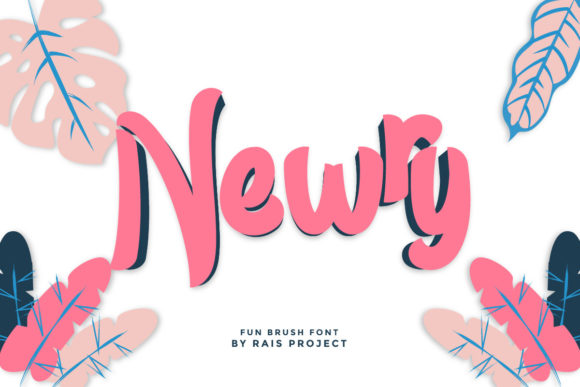
Newry: Integrating a Trendy Paint-Brushed Display Font into Your Creative Workflow
In the fast-paced world of digital design and content creation, typography is often the first point of contact between your message and your audience. While clean sans-serifs dominate corporate communications, there is a growing demand for typefaces that inject personality, warmth, and human touch into visual projects. Newry emerges as a compelling solution in this space. Defined as a trendy and paint-brushed display font, it offers a distinct aesthetic that bridges the gap between raw artistic expression and professional polish. For designers, marketers, and entrepreneurs, understanding how to effectively integrate Newry into your existing workflow can significantly elevate the quality and impact of your creative assets.
Understanding the Role of Display Typography in Modern Design
Before diving into specific implementation strategies, it is essential to recognize where a font like Newry fits within the broader hierarchy of design elements. Display fonts are not intended for long-form body text. Their primary function is to capture attention, establish tone, and guide the viewer’s eye to key information. Newry, with its paint-brushed characteristics, carries an inherent sense of movement and organic texture. This makes it particularly effective for headlines, logos, posters, and social media graphics where immediate visual engagement is critical.
When planning a project, consider the emotional resonance you wish to convey. The brushstroke style of Newry suggests authenticity, creativity, and approachability. It works exceptionally well for brands or projects that want to distance themselves from sterile, corporate minimalism. Whether you are designing a package for an artisanal product, creating a header for a lifestyle blog, or developing promotional materials for a creative workshop, Newry serves as a powerful tool to communicate these values instantly.
Pre-Production: Assessing Compatibility and Project Fit
The integration of any new asset begins with careful evaluation. Before committing to Newry as your primary display typeface, assess its compatibility with your project’s overall visual identity. Ask yourself several key questions during the planning phase:
- Does the tone match? Ensure that the casual, artistic nature of a paint-brushed font aligns with your brand voice. It may not be suitable for highly regulated industries like finance or law, but it excels in fashion, food, travel, and creative services.
- What is the medium? Newry is designed for display purposes. Consider where it will be viewed. Large formats such as banners, billboards, and desktop headers allow the intricate details of the brush strokes to shine. Small mobile screens may require careful sizing to maintain legibility.
- What are the pairing requirements? A strong display font needs a supportive partner. Plan your body text typography early in the process to ensure harmony.
This preparatory step prevents costly revisions later in the design process. By defining the role of Newry upfront, you streamline decision-making and ensure consistency across all deliverables.
Implementation Strategies for Maximum Impact
Once you have determined that Newry is the right choice for your project, the next phase is execution. Here are practical tips for implementing this font effectively within your design workflow.
Pairing with Complementary Typefaces
The success of a display font often depends on its counterpart. Because Newry features irregular edges and varying stroke widths, it pairs best with clean, neutral sans-serif or serif fonts. Avoid pairing it with other decorative or handwritten fonts, as this creates visual clutter and reduces readability. A geometric sans-serif provides a stable foundation that allows Newry to stand out without competing for attention. This contrast creates a balanced composition that is both engaging and easy to navigate.
Hierarchy and Spacing
Proper hierarchy is crucial when using expressive typography. Use Newry exclusively for headings, subheadings, or short call-to-action phrases. Do not use it for paragraphs or dense information blocks. Additionally, pay close attention to kerning and leading. Brush fonts can sometimes have unique spacing characteristics due to their organic shapes. Adjust letter-spacing manually if necessary to ensure that characters do not overlap awkwardly or appear too distant. Consistent spacing contributes to a professional finish, even when using a seemingly casual font.
Color and Background Considerations
The visibility of Newry’s brush textures depends heavily on color contrast. High-contrast combinations work best. For example, dark charcoal text on a white background, or vice versa, ensures that the nuances of the brush strokes are visible. Avoid placing Newry over busy patterns or low-contrast backgrounds, as this can obscure the details and hinder legibility. If you must place text over an image, use overlay techniques such as semi-transparent boxes or drop shadows to separate the typography from the background noise.
Workflow Integration Across Different Platforms
Newry is not limited to static graphic design. Its versatility allows it to be integrated into various digital workflows, enhancing consistency across multiple touchpoints.
- Social Media Content: Create templates in tools like Canva, Adobe Photoshop, or Illustrator that utilize Newry for quote graphics, event announcements, and promotional posts. Saving these as reusable templates ensures brand consistency and speeds up content production.
- Web Design: When implementing Newry on websites, use web-font formats such as WOFF or WOFF2 to ensure fast loading times and crisp rendering across browsers. Limit its use to H1 and H2 tags to maintain performance and readability.
- Print Materials: For business cards, flyers, and packaging, ensure you are using the high-resolution OTF or TTF files. Print proofs are essential to verify that the brush textures reproduce accurately on different paper stocks.
By standardizing the use of Newry across these platforms, you create a cohesive brand experience. Customers recognize the typographic style whether they encounter your brand on Instagram, your website, or a physical product label.
Quality Control and Long-Term Usage
Maintaining the integrity of your design system requires ongoing quality control. As your team grows or as you outsource design tasks, provide clear guidelines on how to use Newry. Document acceptable use cases, forbidden pairings, and minimum size requirements. This documentation prevents misuse and ensures that the font continues to elevate your creations rather than detract from them.
Furthermore, consider the longevity of your design choices. While Newry is described as trendy, its classic brush-style foundation gives it a timeless quality that resists becoming dated quickly. However, trends do shift. Regularly audit your materials to ensure that the font still aligns with your evolving brand identity. If necessary, refresh your pairings or adjust color schemes to keep the look fresh while retaining the core typographic asset.
Enhancing Efficiency with Organized Asset Libraries
Efficiency in creative workflows is often determined by how well assets are organized. Add Newry to your central font library with clear labeling. If you have multiple weights or styles within the Newry family, organize them logically. Use font management software to activate and deactivate fonts as needed, keeping your system lightweight and responsive. This practice reduces clutter in your design applications and speeds up the selection process during intense creative sessions.
Moreover, keep backup copies of your font files in cloud storage. This ensures that you can access Newry from any device, facilitating remote work and collaboration with external partners. Seamless access to your typographic tools removes friction from the creative process, allowing you to focus on execution rather than technical hurdles.
Final Thoughts on Elevating Your Creations
Incorporating Newry into your design toolkit is more than just a stylistic choice; it is a strategic decision to enhance communication through visual appeal. By understanding its strengths, planning its application, and integrating it smoothly into your workflows, you unlock its potential to transform ordinary designs into memorable experiences. Whether you are a seasoned designer or a small business owner managing your own marketing, mastering the use of this paint-brushed display font will add a layer of professionalism and creativity to your output. Remember, the goal is not just to use a trendy font, but to use it wisely, ensuring that every instance of Newry serves a purpose and contributes to the overall success of your project.